TimeMatrix Features · Practical Tutorial
Astro Events: A Step-by-Step Tutorial
Define a planetary event, choose a forward trading-day window, and inspect Daily outcomes and chart highlights.
Sign in to use Astro Event Lab. Unpaid accounts can run bounded AAPL studies; other symbols, Favorites, and saved templates require eligible member access. Members can also use Astro Events beside the active chart.
Step 1
Open an AAPL event study
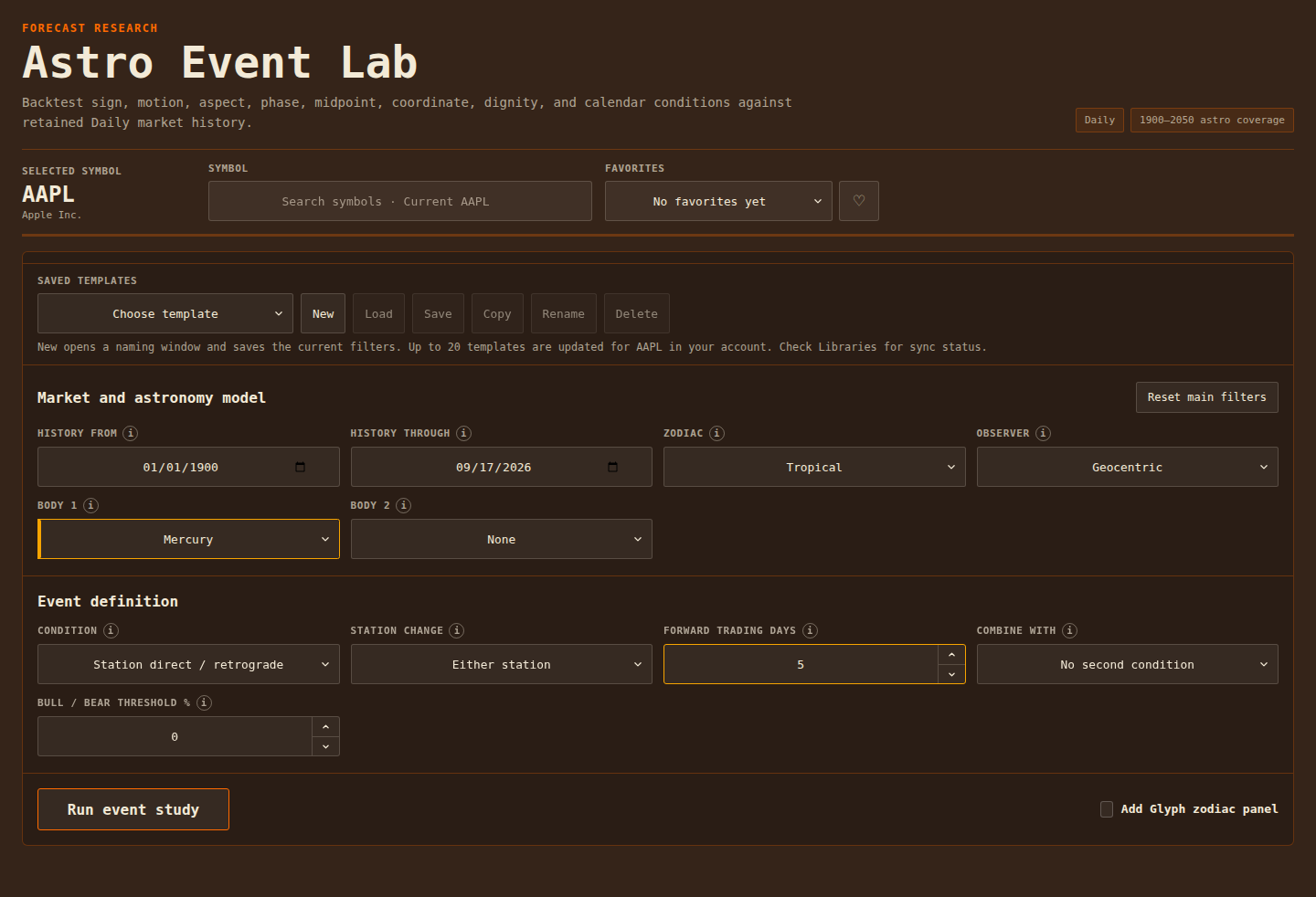
Open Astro Event Lab. In Symbol, search for AAPL and select Apple Inc.; confirm Selected symbol now reads AAPL. A member’s saved selection may initially show another market. Unpaid access is fixed to AAPL. This walkthrough and its screenshot use the standalone Event Lab.
Choose a historical range covered by the available data. Begin with a simple single-body event so you can understand the matching rule before combining conditions.
The Astro Events tab below a chart is an alternative surface using the active chart symbol. Both study Daily history, but switching between them does not mean you have copied the same filters. Complete this first exercise in the standalone Lab.
Step 2
Set a Mercury station exercise
The exercise asks what happened over five trading days following Mercury stations. It does not presume that the event causes a price move.
- Set Zodiac to Tropical and Observer to Geocentric.
- Set Body 1 to Mercury and Body 2 to None.
- Under Condition, choose Station direct / retrograde.
- Set Station change to Either station and Forward trading days to 5.
- Keep Combine with at No second condition and Bull / bear threshold % at 0.
Step 3
Check the event and return definitions
A station is a change between direct and retrograde apparent motion. It differs from selecting every day that Mercury is retrograde. Keep this definition fixed while evaluating the exercise.
Forward trading days count retained market sessions, not calendar days. Five trading days can span a weekend or holiday. The event’s astronomical timestamp and its matched market session serve different purposes; inspect the result rather than assuming they are identical.
Returns default to event open through forward close. For example, an event-session open of $100 and a forward close of $102 gives 2%. This is illustrative arithmetic, not a result for AAPL. Check the displayed return definition before comparing studies.
Step 4
Run and review both favorable and unfavorable outcomes
Select Run event study. Read warnings, event count, available coverage, and the selected result window. Check bullish and bearish shares alongside average returns and the baseline/control information provided.
- Open occurrence details and record an event timestamp, matched market date, and measured return.
- Review a negative occurrence as well as a positive one.
- To inspect shaded Daily matches beside candles later, open the chart’s Astro Events tab, enter the same station settings and date range, and run that study there.
- If too few events remain, expand the history only within available coverage; do not interpret a tiny sample as a stable effect.
Step 5
Build a separate two-body aspect study
After recording the station exercise, change to a two-body question. Select two distinct supported bodies; selecting Body 2 makes aspect conditions available. Choose the angle, phase, and orb explicitly.
Applying, Exact, and Separating describe different stages of an aspect. An exact event and a daily within-orb match are not interchangeable observations. For non-instantaneous conditions, Sampling determines whether to retain the first day of an episode or every matching day.
Record a new study name before making these changes. Keep No second condition until the primary rule is clear. Later, Combine with can add motion, sign, or calendar context using AND, OR, or NOT. Each addition changes the eligible sample.
Step 6
Preserve the setup and test a new period
Record the symbol, date range, zodiac, observer frame, bodies, condition, orb or station choice, sampling, forward window, and threshold. For sidereal work, also record the Ayanamsa.
Members can create a named filter template and check Libraries for sync status. Unpaid AAPL work is temporary, so retain your own research notes. A saved filter setup is not evidence that an effect persists.
Choose settings on one period, then assess a later period without retuning. Report uncertainty and misses. Historical association alone does not establish causation or future predictive performance.
Common questions
Why does changing the observer change the available bodies?
Geocentric and heliocentric models have different valid body combinations. Confirm the observer and body selections after changing the frame.
Can I use a sign passage instead?
Yes. Sign passage measures entry through exit and has different timing from a fixed five-day station study. Read its displayed definition before comparing returns.
Why are some matches absent?
Check the requested history, retained market sessions, valid body/condition combination, event window, and access limits. Read warnings before changing filters.